December 2025 issue
How to securely offboard employees
What’s the one thing that’s almost guaranteed to punch a massive security hole in your business?
An employee leaving.
It sounds simple, but it’s a bigger, more expensive problem than most people think.
In today’s email, I’ll run you through a simple 7-step checklist for when an employee leaves (it’ll also save you a fortune on wasted software licenses).
You’ll also find out how to check if your password has been stolen, what’s new in the tech world (including some wild AI stuff), and why a physical key for your online accounts is a good idea.
Plus, as usual, I’ll share a book that’s a genuinely useful for business owners and a fun fact you can use at your next BBQ.
So grab your favorite beverage of choice, get comfy, and let’s dig in.
THE BIG IDEA

How to Securely Offboard Employees in Just 7 Steps
When it comes to an employee leaving, most businesses log into M365, disable their account, and call it a job done.
But that’s just the first step, and it leaves a lot exposed.
What about all the other stuff they had access to? The accounting software? The password manager? Your project tools, your marketing platform, the company LinkedIn account?
Not only is that a massive security hole, but you’re probably still paying for their licenses.
Here’s a repeatable checklist you can use to keep your business secure every time you offboard an employee:
-
Get or Wipe the Company Hardware. On their last day, get their company laptop, phone, key card, and any physical office keys back. If they’re remote, remotely wipe and lock their company-issued devices immediately. This is step one.
-
Forward Their Email Inbox. Before you nuke their email account, forward it to their manager or a teammate. This stops any client emails or important vendor messages from disappearing into the void.
-
Disable the Primary Account. Now you can disable their main login (Microsoft 365 or Google Workspace). This is what locks them out of their email, cloud storage, and calendar.
-
Go Down the Software Master List. This is the step everyone misses. You must have a master list of all the software your company uses. Go down that list and remove their access from every single app (accounting, marketing, sales, project tools, everything). This is what stops that “software waste.”
-
Change All Shared Passwords. Did they know the password to the company’s social accounts, the main support inbox, or a vendor portal? Change them. All of them.
-
Handle Their Phone Number. If they had a company phone number or extension, forward it to their replacement or a manager. You don’t want clients calling a dead line.
-
Remove Them From Payroll. After you’re 100% sure their final pay and any reimbursements are sorted, remove them from your payroll system. This is the last step that officially closes the loop.
Without a written checklist, you’re almost guaranteed to miss something.
If you’d like to chat about building a secure process for your business, just reach out to this email.
THE TECH TIP
Check If Your Password Has Been Stolen
Ever wonder if your email has been exposed in a data breach? You can check for free in seconds.
Visit haveibeenpwned.com and enter your email address. It will instantly tell you if you’ve been part of a known data leak. If your email is on the list, change the password for the affected site immediately, and for any other account where you’ve used the same one.
THE LATEST NEWS
🗣️ Google Replaces Assistant with Gemini on Home Devices
Google is rolling out “Gemini for Home,” upgrading the Google Assistant on Nest speakers and displays. This update makes the voice assistant more conversational and capable, allowing users to have more natural, back-and-forth chats about complex topics without using the “Hey Google” wake word for every follow-up question.
👁️ Proton Launches Free ‘Data Breach Observatory’
Proton has launched the Data Breach Observatory, a free, public-facing hub that tracks business data leaking onto the dark web in real-time. The tool (which has already identified over 300 million exposed records) shows which industries are being targeted, helping businesses get a more accurate picture of their real-world cyber risks instead of relying on self-reported data.
🧠 UT Dallas Demos Brain-Inspired Computer Prototype
Researchers at UT Dallas have built a neuromorphic computer prototype that learns patterns more like a human brain. This new hardware design is far more efficient, requiring significantly fewer computations and less power for AI tasks than conventional systems, potentially paving the way for more powerful and efficient AI on mobile devices.
THE INTERESTING STATISTIC

The Average Company Wastes 37% of its Software Budget
How many software tools does your company pay for, and how many are actually being used?
An analysis by Zylo found that the average company wastes 37% of its software budget on applications that are unused, underutilized, or completely forgotten.
This waste happens in a few common ways:
-
Shadow IT: An employee signs up for a free trial with a company credit card. The trial expires, the subscription automatically starts, and you begin paying for a tool you never formally approved.
-
Redundant Subscriptions: Your sales team uses Dropbox while your operations team pays for Google Drive. You are now paying two different companies for the exact same function.
-
Orphaned Licenses: An employee leaves the company. Their email is deactivated, but their recurring software licenses for tools like Slack or Adobe are never canceled. These “ghost charges” can continue for months or even years.
These tools are often a security risk, as the may hold sensitive company data, are rarely configured with proper security settings like multi-factor authentication, and are not included in security updates.
A data breach in one of these forgotten apps could compromise your entire business.
Getting control of your software stack is one of the fastest ways to cut costs and reduce risk. A professional software audit identifies every application your company pays for, eliminates wasteful overlap, and makes sure every tool is secure and properly managed.
THE GADGET OF THE MONTH
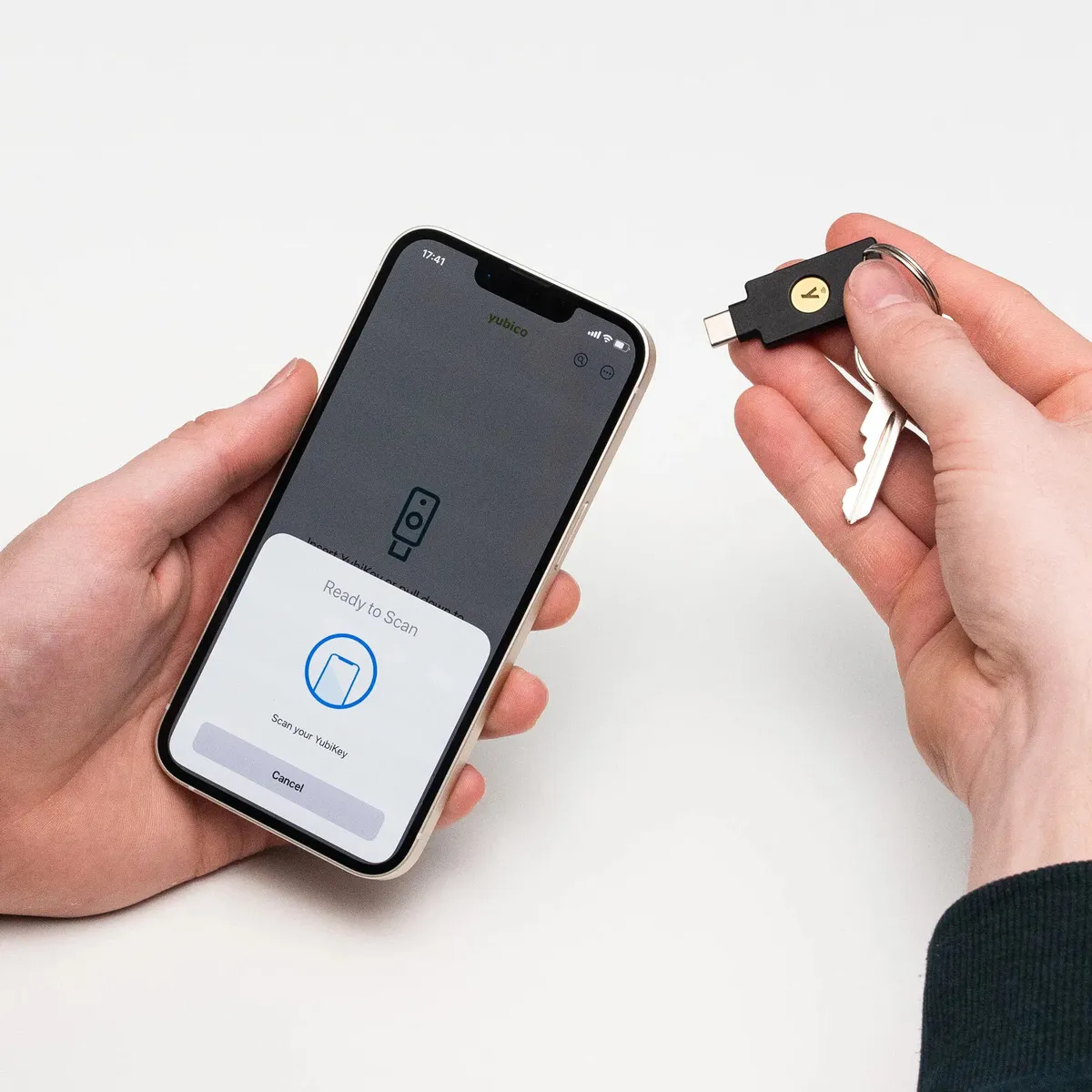
We all know passwords can be stolen, and even the security codes sent to your phone aren’t foolproof. For your most important accounts, like your email, financial software, and cloud storage, a physical security key is probably the best multi-factor authentication solution.
A YubiKey 5C NFC is a small, durable device that you put on your keychain. When you log in somewhere, you plug it into your computer’s USB port or tap it on your phone as your second step of verification.
With this key, even if a hacker successfully steals your password, they still can’t get into your account. Without the physical key in their hand, the stolen password is useless to them.
It adds a physical, real-world layer of security to your digital life. It’s a simple, affordable one-time purchase to make sure only you can access your most critical business information.
THE BOOK OF THE MONTH

Ever feel like you’re just stuck?
Like your business is growing, but you’re dealing with the same problems over and over?
People issues, processes that don’t stick, no one seems to know what the main goal is. It’s a total headache, and it feels like you’re just spinning your wheels.
Traction by Gino Wickman is pretty much the antidote. Wickman lays out a simple system for running your business called the Entrepreneurial Operating System (EOS). Don’t let the fancy name scare you off.
It’s a set of practical, real-world tools to get your head screwed on straight across six key parts of your company.
The whole point is to get everyone, from you down to your new intern, all paddling in the same direction. Everyone knows what the goals are, and everyone knows exactly what their job is.
It’s a guide for owners who want a more structured and consistent way to run their business.

DID YOU KNOW?
The first thing ever sold online wasn’t a book or a CD, like most people would guess. It was a large pepperoni pizza from Pizza Hut. The order was placed back in 1994 through a website the company had created called PizzaNet.
Thanks for reading!
My team and I put this newsletter together to share tech advice that’s actually useful, and (hopefully) even fun to read 🙂
When we’re not writing these, we’re helping businesses like yours become more secure and stay productive without all the tech headaches.
If you ever need a professional opinion on anything IT related, simply reach out and let me know. If you want to book a meeting to chat, here is our calendar
We’re here to help 🙂