October 2026 issue
Fix this before your next employee leaves
When an employee leaves, you know to collect their laptop and close their work accounts. But if they created an automation through one of those accounts, closing it can also stop a task your team relies on.
We’ll show you what to check before your next employee leaves, plus a quick Excel trick and a USB drive that protects sensitive files if it goes missing.
So grab your favorite beverage, get comfy, and let’s dig in.
THE BIG IDEA

When an Employee Leaves, Their Automations May Break
Many businesses use Power Automate or Zapier to move information between apps.
One workflow might copy website enquiries into the CRM. Another might save invoice attachments into the right folder.
A workflow is just a set of steps that runs automatically.
These workflows are often built under one employee’s account. They may also use that person’s login to read a mailbox or update another system.
If the employee leaves and their account is disabled, those connections may stop working. Microsoft calls a flow with no valid owner an “orphaned flow.”
The workflow may not stop completely. Microsoft says it can keep running if another active owner has been added, but any step that uses the former employee’s connection may fail.
Zapier also warns that workflows can be disrupted when the person who built them leaves.
You may not see a warning unless someone checks Power Automate or Zapier. Staff may only notice when website enquiries stop reaching sales or an approval email doesn’t get sent.
Fixing it takes longer if nobody knows who built the workflow or which accounts it uses.
You can prevent most of these problems by checking three things:
-
Start with an inventory. Check Power Automate, Zapier, Make, and any other tool your team uses. Record what each workflow does, who owns it, and which accounts it connects to.
-
Important workflows need a second owner. Add another employee or an IT-managed group as a co-owner before the original owner leaves.
-
Replace their connections before closing the account. Reconnect each app using the new owner’s account or another company-managed account. Test the workflow before disabling the employee’s login.
Add this check to your offboarding process. It takes less time than finding out weeks later that new leads aren’t reaching sales or invoices aren’t being saved.
If you want help, reply and we’ll check which automations your business has, who owns them, and whether any depend on accounts that should no longer be active.

THE TECH TIP
Turn a Picture Into an Excel Table
In Excel for Microsoft 365, go to Data > From Picture and choose an image of a table. Excel turns it into editable cells.
THE LATEST NEWS
📢 ChatGPT ads are expanding across Europe
OpenAI is bringing ChatGPT ads to 31 European markets. Ads can appear for Free and Go users, while Plus, Pro, Business, Enterprise, and Edu accounts remain ad-free. Businesses can currently advertise through OpenAI or its partners, with self-service access coming soon.
🔐 OpenAI adds a zero-retention option for business systems
Eligible API customers can now prevent OpenAI from retaining their prompts and responses on supported services. This applies to software built with OpenAI’s API, not regular ChatGPT accounts, and some features don’t support it. If your business uses an AI tool with sensitive data, ask the provider what it stores and for how long.
🤖 Microsoft makes work accounts easier to spot in Copilot
Microsoft has started adding account labels, different backgrounds, and a green shield for work accounts in its Copilot apps. Before entering company information, check that you’re signed in with your work account and can see the shield.
THE INTERESTING STATISTIC

82% of Surveyed Small Businesses Worry About Losing Access to Their Systems
The OECD found this in its 2026 survey of more than 2,000 small businesses across 12 countries. Losing access doesn’t always involve a cyberattack. An employee may leave with the only admin account, or the recovery details may belong to someone who left years ago.
If that account controls your email or billing system, work can stop while you prove ownership and try to restore access.
Start with the systems your team needs every day. Make sure each has at least two company-controlled administrators, and check that its recovery email and phone number are current.
If you’re not sure which accounts could lock out your team, reply and we’ll help you check.
THE GADGET OF THE MONTH
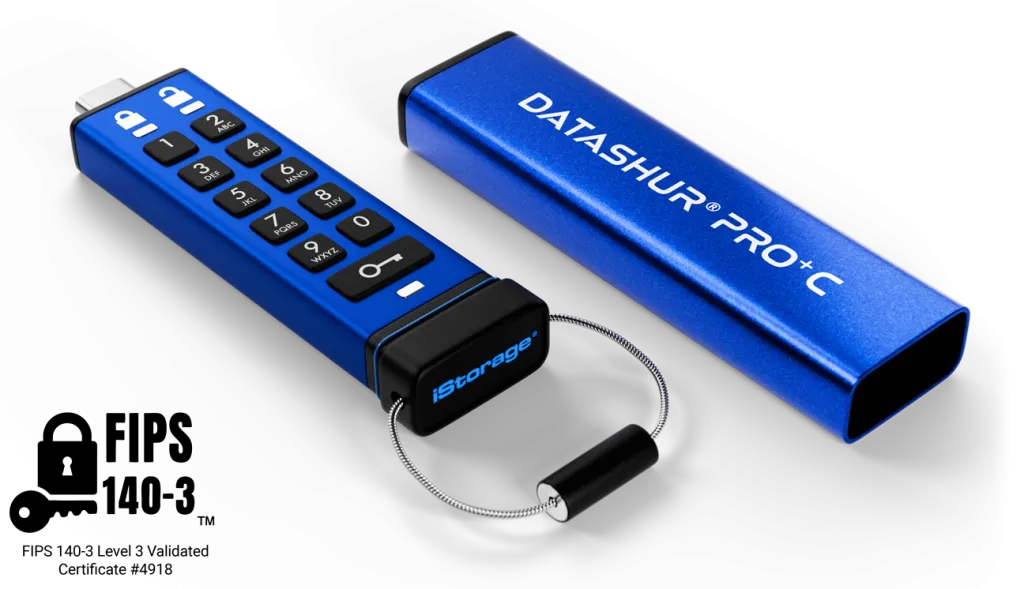
USB drives are useful, but they’re easy to forget in a café or coworking space. With a normal drive, whoever finds it may be able to open every file.
The datAshur PRO+C keeps your files encrypted until you enter a PIN on its built-in keypad. It works without extra software, so you can use it on different computers.
If you carry client records or financial documents, that extra protection makes sense.
THE BOOK OF THE MONTH

Most project problems begin before the work starts. In How Big Things Get Done, Flyvbjerg and Gardner explain how rushed planning and overconfident forecasts push projects over budget.
Their advice is to spend more time planning, then move quickly once the plan has been tested.

DID YOU KNOW?
Motorola engineer Martin Cooper made the first mobile phone call in 1973.
The prototype phone weighed more than one kilogram, and a commercial version didn’t arrive until ten years later.
Thanks for reading!
My team and I put this newsletter together to share tech advice that’s actually useful, and (hopefully) even fun to read 🙂
When we’re not writing these, we’re helping businesses like yours become more secure and stay productive without all the tech headaches.
If you ever need a professional opinion on anything IT related, simply reach out and let me know.
We’re here to help 🙂